Developer fixing Chat GPT 5 cutoffs in 2025

Fix Chat GPT 5 Cutoffs in 2025

When you ask about ChatGPT 5 cutoffs, you’re referring to the knowledge-cutoff dates that limit how up-to-date the model is with information. While the topic may seem technical, understanding these cut-off boundaries is vital for users such as website designers, developers, content creators and anyone relying on AI tools. In this article we’ll unpack how the cut-offs work for GPT‑5, why they matter in 2025, and practical tips for managing them—especially if you’re using AI as part of your web-design or development workflow.


What are the knowledge cut-off thresholds?

Understanding why ChatGPT 5 cutoffs exist

Every large language model, including GPT-5, is trained on a fixed dataset that ends at a certain date. That date marks a knowledge cut-off: the point beyond which the model doesn’t “know” about events, technologies, or changes unless it uses live retrieval. ChatGPT OSS+3Wikipedia+3Arsturn+3
For GPT-5, sources indicate the base model has a knowledge cut-off around October 1 2024, while smaller variants (mini/nano) may cut-off around May/June 2024. Data Studios ‧Exafin+2ChatGPT OSS+2
Why does this matter? Because if you ask a question about something that happened after the cut-off, the model might guess or hallucinate rather than provide verified facts.


How the training cut-off impacts everyday users

The practical implications of ChatGPT 5 cutoffs

When working as a web designer or developer, the knowledge cut-off of GPT-5 means:

  • New features in tools (like Wix, Shopify or WordPress) launched after the cut-off may not be understood by GPT-5.
  • Trends in SEO, design standards or development practices that emerge after October 2024 might be missing or mis-represented.
  • If you rely solely on GPT-5 without verification, you may spread outdated information or miss critical updates.

Thus the phrase “ChatGPT 5 cutoffs” is more than just academic—it influences how reliable the responses are for current-day workflows.


Where exactly is GPT-5’s cut-off?

Pinpointing specific cut-off dates for GPT-5 models

Evidence from multiple sources:

  • A community-compiled list notes GPT-5’s knowledge cut-off as October 01 2024 for the main model. allmo.ai
  • Another deep-dive article lists the main GPT-5 model as up to September 30 2024, with mini/nano variants at May 30 2024. Fello AI
  • Some forums point out that when users ask GPT-5 “what’s your knowledge cut-off?”, it may still answer June 2024—indicating they might be interacting with a variant or the system hasn’t communicated the full distinction. Reddit

In short: if you’re using GPT-5 via ChatGPT, you should assume that any event or update after October 2024 may not be reliably contained within its internal knowledge.


Why these cut-offs matter for your web-design & development workflow

Managing the limitations of ChatGPT 5 cutoffs

If you build websites or develop for clients using tools like Wix, Shopify or WordPress and you use GPT-5 for assistance, here are some actionable considerations:

  1. Always verify post-cut-off facts. When GPT-5 gives info about something that occurred in late 2024 or 2025, cross-check with authoritative sources.
  2. Use browsing or tool-enabled versions. Many models now have retrieval-augmented generation (RAG) or browsing enabled—this helps bypass some cut-off issues.
  3. Clarify in prompts what focus you need. If you ask for the “latest Shopify theme updates in 2025” you should explicitly mention you’re looking for post-2024 developments, and then verify results.
  4. Maintain a human-in-the-loop for client deliverables. The AI can speed things up, but a human review is essential when working with innovations or recent launches.
  5. Teach clients about limitations. If you rely on GPT-5 for ideation or code suggestions, let clients know that you’ll validate new items manually because of the “ChatGPT 5 cutoffs”.

Tips for working around the cut-off boundary

Smart strategies to mitigate the effect of knowledge cut-offs

Here are some savvy ways to keep your work current despite the “ChatGPT 5 cutoffs” limitation:

  • Prompt with context: Ask GPT-5 something like “Based on your knowledge up to October 2024, and my additional research shows XYZ in 2025, how should I incorporate it?”
  • Combine with live search: Use GPT-5’s responses as a baseline, then run a quick Google or official source check for updates after 2024.
  • Pin version awareness: If using GPT-5 mini or nano variant (for speed), keep in mind their earlier cut-off (May/June 2024) and adjust your checking accordingly.
  • Document and update your toolkit: Keep a living list of new releases (themes, plugins, design trends) from late 2024 and 2025, so you can reference them even if GPT-5 doesn’t.
  • Maintain a feedback loop: If you find GPT-5 giving outdated advice, log it and flag it for your future reference; this saves time later.

My services as a Wix designer/developer

When clients engage me for Wix site builds, theme customisation or responsive design, I leverage tools including GPT-5—but I also layer in real-time research and manual validation. Because of the “ChatGPT 5 cutoffs” factor, I don’t rely solely on the AI. Instead I deliver solutions that are aligned with 2025’s standards, optimised for SEO, mobile responsiveness and user experience. If you’re looking to upgrade your Wix site with the latest features and best practices, I can support you with full confidence in current trends.


Frequently Asked Questions

Q1: What is the knowledge cut-off for GPT-5?
The main GPT-5 model is trained on data up to around October 2024; smaller variants may cut off around May or June 2024. ChatGPT OSS+1

Q2: Does GPT-5 know about 2025 events?
Not inherently. Unless retrieval/browsing is enabled, GPT-5 may lack reliable information for many 2025 developments because of the cut-off boundary.

Q3: Does the knowledge cut-off mean GPT-5 is “outdated”?
No. It still performs very well and understands patterns, reasoning and many tasks—but for brand-new facts or specific 2025 changes you may need to verify externally.

Q4: How can I check which variant of GPT-5 I’m using?
You can ask it “What is your knowledge cut-off date?” The answer may reveal whether you’re using the full model (October 2024 cut-off) or a mini-variant (May/June 2024). Some users report June 2024 when interacting with mini. Reddit

Q5: As a web designer/developer, how should I deal with these cut-offs?
Use GPT-5 as a strong assistant, but always validate new or trending elements post-2024 with official documentation or recent sources. This ensures your client work remains fully current.


In conclusion: the term ChatGPT 5 cutoffs encapsulates a key limitation that all users need to understand. It doesn’t mean GPT-5 is ineffective—it means you should be smart about how you use it, especially for tasks that involve very recent changes. If you’re looking for modern Wix design, SEO-ready development or site updates that truly reflect 2025 standards, I can help ensure your site is built right, with the best human + AI synergy.

Ready to bring your website into the present? Contact me at aounraza.mrwebapp.com and let’s start building together.

Read More:-

Contact Syed Aoun Raza professional web designer and developer

How to contact Syed Aoun Raza

If you’re looking for a professional who blends creativity, technical skill, and business strategy, you’re in the right place. This guide will help you understand

Read More »
Syed Aoun Raza working on web design and development project

Why choose Syed Aoun Raza

When building or improving a website, the choice of designer and developer can determine your brand’s success online. That’s why understanding why choose Syed Aoun

Read More »
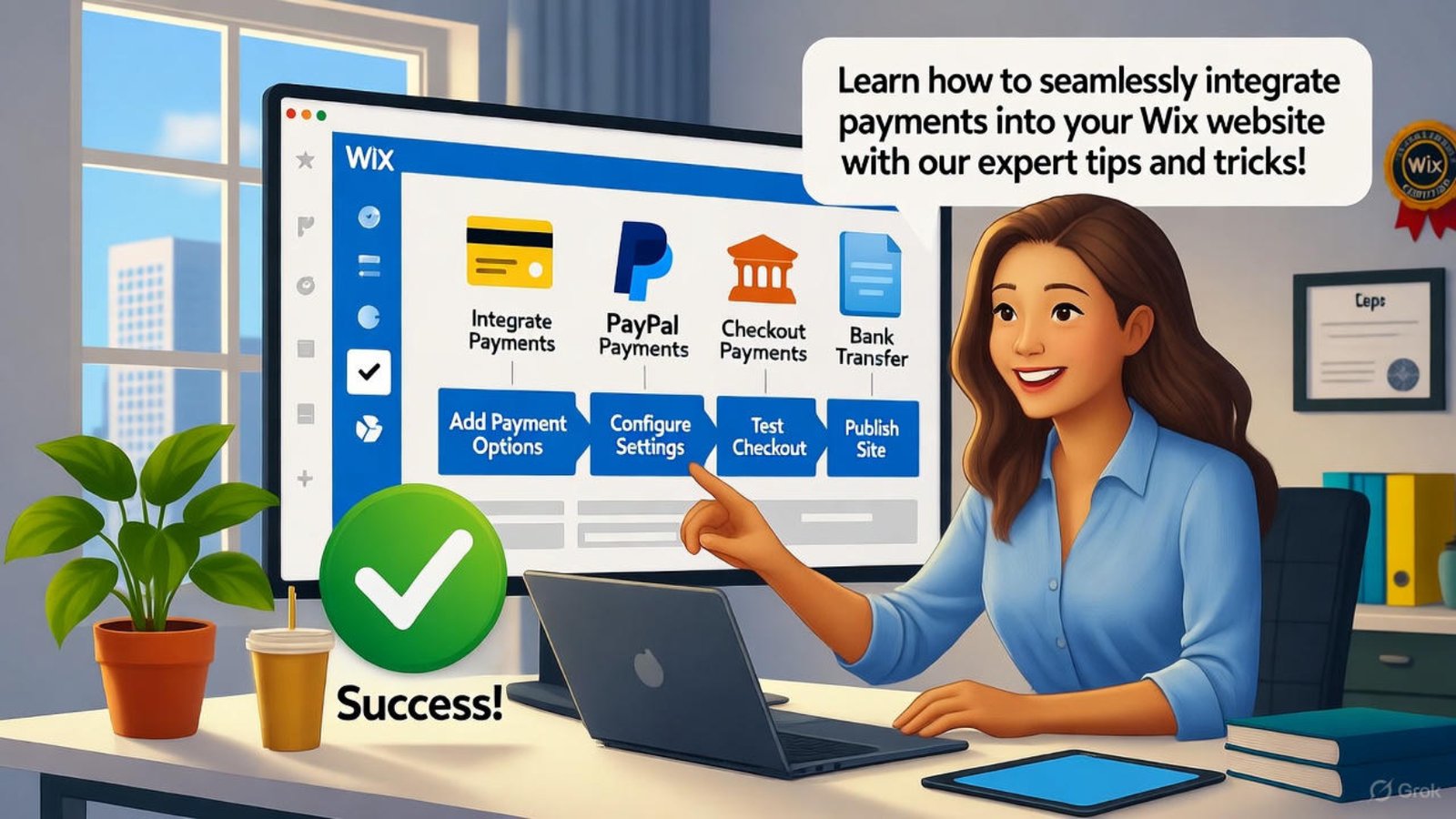
Developer integrate payments Wix website builder

Integrate Payments Wix Website Builder 2025

You want customers to buy from your site without friction. Learning how to integrate payments Wix website builder in 2025 lets you accept credit cards, PayPal, and more in minutes. This guide shows exact steps to set up secure checkout—plus, hire me from my portfolio to launch your store smoothly.

With the right setup, sales start flowing. Let’s build your payment-ready site today.

Why Integrate Payments Wix Website Builder Now

Online shoppers expect fast checkout. When you integrate payments Wix website builder, you meet that need and boost conversions.

It also opens global markets. In 2025, mobile payments dominate, so your site must handle them.

Boost Sales Instantly

A seamless payment flow turns visitors into buyers. Adding this feature cuts cart abandonment significantly.

You gain trust with branded checkout. Customers stay on your domain.

Reach Mobile Shoppers

Over 60% of purchases happen on phones in 2025. Proper integration ensures smooth mobile transactions.

Responsive design keeps everything functional. This drives repeat business.

Stay Competitive

Rivals already accept payments online. Following this guide keeps you in the game.

It prepares you for future trends like buy-now-pay-later. You stay ahead.

Steps to Integrate Payments Wix Website Builder

Start inside your Wix dashboard. Click “Accept Payments” to begin the process.

Choose your preferred method next. Options include Wix Payments, Stripe, or PayPal.

Pick Your Payment Provider

Wix Payments offers built-in ease. Connect it directly—no extra apps needed.

For more currencies, add Stripe. It supports over 135 countries.

Moreover, check Wix Payments setup for details.

Connect Your Account

Enter business info like tax ID. Verify your bank account for payouts.

This step takes under 10 minutes. Approval follows within days.

Additionally, our ecommerce tips speed verification.

Add Products and Pricing

Upload items with clear photos. Set prices and shipping rules.

Test the cart before going live. This catches errors early.

Furthermore, Shopify’s payment guide inspires layouts.

Customize Checkout for Better Results

Keep branding consistent across checkout. Use your logo and colors to build recognition.

Add trust badges like SSL icons. Customers feel safe entering card details.

Simplify the Form

Ask only essential info. Remove extra fields to reduce drop-offs.

Enable guest checkout. It speeds up the process.

Offer Multiple Options

Include Apple Pay and Google Pay. Mobile users love one-tap purchases.

This variety suits different preferences. Sales increase naturally.

Set Up Taxes and Shipping

Automate tax calculations per region. Wix handles this based on location.

Define flat or real-time shipping. Accuracy prevents disputes.

Test Before Launching Payments

Run test transactions with sandbox mode. Confirm everything works without real charges.

Check emails for order confirmations. This verifies customer communication.

Simulate Different Scenarios

Test low-stock items and discounts. Ensure the system updates inventory.

Try failed payments to see error messages. Clear guidance helps users.

Review on Mobile Devices

Open your site on phones and tablets. Tap buttons to confirm responsiveness.

Fix any layout shifts. Smooth experience matters most.

Secure Your Payment Integration

Enable HTTPS across your site. Wix provides free SSL certificates.

Monitor for fraud with built-in tools. Set alerts for unusual activity.

Comply with PCI Standards

Wix handles PCI compliance automatically. You avoid storing card data.

This reduces your liability. Focus on selling instead.

Protect Customer Data

Use strong admin passwords. Enable two-factor authentication.

Regular backups prevent data loss. Peace of mind follows.

Moreover, Wikipedia’s PCI page explains standards.

Scale Payments as You Grow

Add subscription options later. Wix supports recurring billing easily.

Expand to new markets with local gateways. Growth becomes seamless.

Handle Higher Volume

Upgrade bandwidth if traffic spikes. Wix scales hosting automatically.

Monitor payout schedules. Weekly deposits keep cash flow steady.

Track Performance

Use Wix Analytics for sales reports. Spot top products quickly.

Adjust based on data. This drives smarter decisions.

Additionally, HubSpot’s sales tracking offers insights.

Advanced Payment Features for 2025

Integrate buy-now-pay-later services. Klarna and Afterpay attract budget shoppers.

Add multi-currency display. Visitors see prices in their money.

Automate Abandoned Carts

Send reminder emails automatically. Recover lost sales effortlessly.

Personalize messages with product names. Conversion rates rise.

Offer Digital Wallets

Support Amazon Pay and others. Checkout becomes instant.

This caters to tech-savvy audiences. Loyalty builds fast.

Furthermore, our advanced features guide explores options.

Common Issues and Fixes

Payment buttons sometimes vanish on mobile. Refresh the editor and republish.

Payouts delay if bank details mismatch. Double-check routing numbers.

Gateway Connection Drops

Reconnect the provider in settings. Test a small transaction.

This resolves most errors. Sales resume quickly.

Currency Display Errors

Set default currency in store settings. Save and refresh pages.

Consistency returns instantly. Customers stay confident.

Maintain Your Payment Setup

Update provider apps regularly. Wix notifies you of changes.

Review fees quarterly. Switch if better rates appear.

Audit Security Monthly

Run Wix’s security scanner. Fix flagged items promptly.

Strong habits prevent breaches. Reputation stays intact.

Backup Orders Weekly

Export sales data to CSV. Store copies offsite.

Recovery becomes easy. Business continues uninterrupted.

Future-Proof Your Store

Plan for voice commerce integration. Wix prepares for emerging tech.

Add AR product previews. Engagement deepens in 2025.

Embrace Contactless Payments

QR codes speed in-person sales. Link them to your site.

Hybrid shopping grows. You capture every opportunity.

Monitor Industry Shifts

Follow payment trend reports. Adapt features accordingly.

Flexibility wins markets. Growth accelerates naturally.

FAQs

How fast can I integrate payments Wix website builder? Under 30 minutes with Wix Payments. I can do it faster—check my portfolio!

Do I need coding to add payments? No, Wix handles it. Hire me from my portfolio for custom needs!

Which providers work best in 2025? Wix Payments and Stripe lead. I recommend based on your market!

What if a payment fails? Wix retries automatically. I troubleshoot issues—see my portfolio!

Can I offer subscriptions? Yes, with Wix Stores. I set it up—visit my portfolio!

Ready to start selling online? Explore my portfolio at aounraza.mrwebapp.com and let me build your payment-ready Wix store today.


Read More:-

Contact Syed Aoun Raza professional web designer and developer

How to contact Syed Aoun Raza

If you’re looking for a professional who blends creativity, technical skill, and business strategy, you’re in the right place. This guide will help you understand

Read More »
Syed Aoun Raza working on web design and development project

Why choose Syed Aoun Raza

When building or improving a website, the choice of designer and developer can determine your brand’s success online. That’s why understanding why choose Syed Aoun

Read More »
Developer fixing stop Wix website builder mobile glitches

Stop Wix Website Builder Mobile Glitches 2025

Mobile users expect smooth experiences, and nothing frustrates them more than glitches. You can stop Wix website builder mobile glitches in 2025 with practical tweaks that make your site responsive and reliable. This guide shares proven steps to fix common issues and boost satisfaction—visit my portfolio to hire me as your Wix expert.

With the right adjustments, your site performs flawlessly on phones. Let’s explore how to identify and resolve these problems today.

Why Mobile Glitches Happen in Wix Website Builder

Wix sites face mobile challenges from heavy elements or poor settings. Understanding this helps you stop Wix website builder mobile glitches effectively.

Overloaded images or scripts slow down loading. This leads to jumps and misaligned content on smaller screens.

Common Causes of Mobile Issues

Large media files strain mobile connections. Compress them to prevent delays and glitches.

Complex animations also trigger problems. Simplify them for smoother performance.

Moreover, check Wix support on mobile optimization. It explains root causes clearly.

Impact on User Experience

Glitches drive visitors away quickly. Fixing them keeps engagement high and supports your goals.

Search engines favor mobile-friendly sites. This improves rankings in 2025.

Steps to Stop Wix Website Builder Mobile Glitches

Start by previewing your site on mobile view. This reveals where to stop Wix website builder mobile glitches fast.

Adjust layouts and test changes live. Regular checks ensure lasting results.

Enable Mobile Optimization

Wix offers a mobile editor for adjustments. Use it to rearrange elements and fix overlaps.

Hide desktop-only features on phones. This prevents clutter and errors.

Additionally, our Wix tips page covers editor basics.

Compress Images Properly

Resize photos before uploading. Tools like TinyPNG reduce file size without quality loss.

Set image loading to lazy. This speeds up initial views on mobile.

Furthermore, WordPress image guide applies similar principles.

Simplify Navigation Menus

Limit menu items on mobile. A hamburger icon keeps things clean and functional.

Test dropdowns for easy tapping. This avoids accidental clicks.

Best Practices to Prevent Wix Mobile Glitches

Use Wix’s built-in mobile settings consistently. This approach helps you stop Wix website builder mobile glitches before they start.

Monitor performance with analytics. Adjust based on real data.

Also, explore my portfolio for glitch-free Wix projects.

Choose Responsive Templates

Start with mobile-ready designs. Wix templates adapt automatically to screens.

Avoid custom code that breaks responsiveness. Stick to editor tools.

Moreover, HubSpot’s mobile design tips reinforce this.

Test Across Devices

Use BrowserStack or real phones for checks. This catches device-specific issues early.

Run tests after every update. It maintains consistency.

Reduce Third-Party Apps

Limit apps that add scripts. Each one can cause conflicts on mobile.

Review app necessity regularly. Remove unused ones promptly.

Advanced Fixes for Persistent Mobile Glitches

Edit CSS for fine control when needed. This targets specific elements causing problems.

Clear cache on your site and device. It resolves temporary display errors.

Furthermore, our advanced Wix guide dives deeper.

Adjust Font Sizes

Increase base font for mobile readability. This prevents zooming issues.

Use relative units like rem. They scale better across devices.

Fix Button Spacing

Add padding around clickable areas. This meets touch target standards.

Test taps on various screen sizes. Ensure accuracy every time.

Tools to Monitor Wix Mobile Performance

Google PageSpeed Insights scores your site. Use it to spot and stop Wix website builder mobile glitches.

Wix Analytics tracks bounce rates. High numbers signal mobile problems.

Implementing Fixes Quickly

Prioritize high-traffic pages first. This delivers fast improvements.

Document changes for future reference. It streamlines ongoing maintenance.

Staying Updated in 2025

Wix releases mobile enhancements often. Enable auto-updates to benefit.

Join Wix forums for community tips. They share real-time solutions.

Moreover, Wikipedia’s responsive design page offers history and trends.

Long-Term Strategies for Glitch-Free Wix Sites

Build with mobile-first in mind. This prevents issues from the start.

Train your team on best practices. Consistent habits reduce errors.

Also, hire me via my portfolio for professional Wix support.

Regular Audits

Schedule monthly mobile reviews. This catches new glitches early.

Use checklists for thorough checks. Cover images, links, and forms.

User Feedback Integration

Add a feedback form on mobile. Visitors report issues directly.

Act on common complaints swiftly. This builds trust and loyalty.

FAQs

Why do buttons misclick on Wix mobile? Spacing is too tight. Add padding in the editor!

How do I compress images for Wix? Use TinyPNG before upload. It’s quick and free!

Can animations cause mobile glitches? Yes, simplify them. Test in mobile view!

What if my menu overlaps content? Hide desktop items. Use the mobile editor!

How often should I test mobile? Monthly or after updates. Stay proactive!

Ready for a glitch-free Wix site? Visit aounraza.mrwebapp.com and explore my portfolio to hire me as your Wix designer and developer today.

Read More:-

Contact Syed Aoun Raza professional web designer and developer

How to contact Syed Aoun Raza

If you’re looking for a professional who blends creativity, technical skill, and business strategy, you’re in the right place. This guide will help you understand

Read More »
Syed Aoun Raza working on web design and development project

Why choose Syed Aoun Raza

When building or improving a website, the choice of designer and developer can determine your brand’s success online. That’s why understanding why choose Syed Aoun

Read More »
Developer fixing slow Wix website builder speed

Fix Slow Wix Website Builder Speed 2025

Slow loading frustrates visitors and hurts sales. You can fix slow Wix website builder speed in 2025 with simple tweaks that deliver instant results. This guide shares proven methods to speed up your site and keep users happy—plus, hire me through my portfolio to optimize your Wix site today.

Fast sites rank higher and convert better. Let’s start fixing your Wix performance right now.

Why Fix Slow Wix Website Builder Speed?

Google penalizes slow pages in search results. Fixing slow Wix website builder speed improves rankings and user experience.

Mobile users expect loads under three seconds. Delays push them to competitors.

Impact on Bounce Rates

Visitors leave if pages lag. Speed fixes cut bounce rates dramatically.

This keeps potential customers engaged. It also boosts trust in your brand.

SEO Consequences

Search engines favor quick sites. Slow Wix pages drop in rankings fast.

Optimizing speed lifts visibility. It drives more organic traffic.

Sales and Conversions

E-commerce sites lose revenue per second of delay. Speed improvements increase checkout completions.

This directly grows your bottom line. Every millisecond counts.

Common Causes of Slow Wix Sites

Heavy images top the list of slowdowns. Large files clog load times.

Too many apps also strain performance. Each one adds code overhead.

Image Size Issues

Unoptimized photos bloat pages. Compress them to reduce weight.

This single change often doubles speed. Tools make it easy.

App Overload

Extra Wix apps slow rendering. Remove unused ones regularly.

Keep only essentials active. This lightens the load.

Poor Code Practices

Custom code can create bottlenecks. Clean scripts improve efficiency.

Audit embeds often. Streamline for better flow.

Steps to Fix Slow Wix Website Builder Speed

Start with Wix’s built-in tools. They identify issues quickly.

Then apply targeted fixes. Results appear almost immediately.

Run Wix Site Speed Test

Open the editor and check performance reports. Wix highlights problem areas.

Follow its suggestions first. This builds a strong base.

Moreover, use Wix’s speed guide. It offers official tips.

Compress All Images

Use Wix’s image optimizer or external tools. Reduce file sizes without quality loss.

Upload smaller versions. Pages load faster instantly.

Additionally, our image optimization tips help further.

Remove Unused Apps

Go to the App Market in your dashboard. Delete anything you don’t need.

Fewer apps mean less code. Speed jumps noticeably.

Furthermore, WordPress performance plugins inspire similar pruning.

Optimize Images for Wix Speed

Choose WebP format for modern browsers. It shrinks files significantly.

Resize before uploading. This prevents scaling issues.

Use Wix Image Tools

Wix auto-converts and compresses uploads. Enable this feature in settings.

It handles optimization behind the scenes. You focus on design.

Lazy Load Images

Enable lazy loading in site settings. Images appear only when scrolled to.

This cuts initial load time. Users notice smoother browsing.

Limit Image Count

Keep hero images to one per page. Use thumbnails for galleries.

Fewer visuals speed everything. Balance looks and performance.

Streamline Apps and Code

Audit third-party embeds monthly. Remove slow scripts.

Replace heavy apps with lightweight alternatives. This maintains functionality.

Minify Custom Code

Combine CSS and JavaScript files. Remove extra spaces and comments.

Clean code runs faster. Wix supports this in the dev mode.

Moreover, HubSpot’s code tips apply here.

Defer Non-Essential Scripts

Load scripts after page content. This prioritizes visible elements.

Users see pages sooner. It feels snappier overall.

Use Wix Code Sparingly

Limit custom HTML embeds. Native Wix elements perform better.

Stick to built-in features. Speed stays consistent.

Improve Hosting and Caching

Wix hosts all sites efficiently. Still, caching boosts delivery.

Enable browser caching in settings. Visitors load pages quicker on return.

Activate Wix Turbo

Upgrade to Wix Turbo if available. It accelerates global delivery.

This premium feature cuts latency. Ideal for international audiences.

Additionally, check my portfolio for Turbo setups.

Clear Site Cache

Flush cache from the editor regularly. This removes outdated files.

Fresh loads perform better. Do this after major updates.

Monitor Server Response

Wix manages servers, but check uptime. Use external tools for alerts.

Quick responses keep speed stable. Reliability matters.

Mobile Optimization for Wix Speed

Mobile traffic dominates in 2025. Optimize for smaller screens first.

Test on real devices. Emulators miss real-world lags.

Enable AMP Pages

Wix supports AMP for blogs. It strips pages to essentials.

Mobile users get lightning loads. Engagement rises fast.

Moreover, Wikipedia’s AMP page explains benefits.

Simplify Mobile Menus

Use hamburger icons to hide navigation. This reduces mobile clutter.

Clean layouts load faster. Users find content easily.

Reduce Mobile Animations

Limit parallax and scrolls. Simple effects work best on phones.

This prevents janks and delays. Smoothness wins.

Advanced Fixes for Wix Speed

Connect to a CDN if possible. Wix integrates with some providers.

This distributes assets globally. Load times drop worldwide.

Custom Domain DNS

Use Wix’s nameservers for faster routing. Avoid third-party delays.

This small switch helps. Speed gains add up.

Additionally, our advanced Wix guide covers DNS.

Preload Critical Resources

Add preload tags for key fonts. Browsers fetch them early.

Pages render sooner. First paint improves.

Monitor with Analytics

Track load times in Wix Analytics. Spot trends over weeks.

Adjust based on data. Continuous improvement pays off.

FAQs

Why does my Wix site load slowly? Heavy images and apps often cause it. Compress and prune them.

How do I test Wix speed? Use Wix’s built-in report or Google PageSpeed.

Can I fix speed without coding? Yes, Wix tools handle most issues. I can help—check my portfolio!

What’s the fastest image format? WebP works best. Wix supports it natively.

How often should I optimize? Check monthly. Hire me for ongoing support—see my portfolio!

Ready for a lightning-fast Wix site? Visit aounraza.mrwebapp.com and explore my portfolio to hire me as your Wix expert today.

Read More Now:-

Contact Syed Aoun Raza professional web designer and developer

How to contact Syed Aoun Raza

If you’re looking for a professional who blends creativity, technical skill, and business strategy, you’re in the right place. This guide will help you understand

Read More »
Syed Aoun Raza working on web design and development project

Why choose Syed Aoun Raza

When building or improving a website, the choice of designer and developer can determine your brand’s success online. That’s why understanding why choose Syed Aoun

Read More »
Developer following Chat GPT 5 Pro free trial guide 2026

Chat GPT 5 Pro Free Trial Guide 2026

AI is transforming how we work, create, and communicate — and Chat GPT 5 Pro sits at the heart of that revolution. If you’re wondering how to access the Chat GPT 5 Pro free trial in 2026 without paying upfront, you’re in the right place. This comprehensive guide explains everything: how to sign up, what features you get, and how to maximize your trial period effectively.

Let’s dive into the world of GPT-5 and see how you can start using it for free, safely and smartly.


What Is Chat GPT 5 Pro and Why Everyone Wants the Free Trial

Understanding GPT-5 Pro in 2026

GPT-5 Pro is OpenAI’s premium version of the powerful GPT-5 model. It’s designed for professionals, creators, and businesses that need faster processing, deeper reasoning, and higher message limits.
Unlike the basic free GPT-5 model, GPT-5 Pro offers priority access, better uptime, and early access to advanced AI features. For many users, trying the Chat GPT 5 Pro free trial is the best way to experience its capabilities before upgrading.

Why GPT-5 Pro Matters for Businesses and Creators

In 2026, thousands of startups and digital creators depend on GPT-5 Pro for writing content, coding automation, customer support, and idea generation. It’s not just about speed — it’s about accuracy and consistency. The free trial lets you test these benefits without financial risk.


How to Get Chat GPT 5 Pro Free Trial in 2026

Step 1 — Sign Up for an OpenAI Account

Go to OpenAI’s official website and create an account using your email or Google credentials. Once verified, you’ll gain access to the free GPT-5 model. New accounts often qualify for Pro trial invitations depending on availability.

Step 2 — Look for Official Trial Offers

Keep an eye on help.openai.com and OpenAI’s official X (Twitter) page. They frequently announce free trial campaigns or limited-time upgrades for GPT-5 Pro users. Some users may receive email invitations with a one-week or two-week free trial period.

Step 3 — Access Chat GPT 5 Pro via Partner Platforms

Microsoft, Notion, and Canva integrate GPT-5 technology into their apps. By signing up for free accounts on these platforms, you can use GPT-5-level features indirectly — giving you a similar experience to Chat GPT 5 Pro free trial without needing a subscription.

Step 4 — Use the Free Tool at aounraza.mrwebapp.com

On aounraza.mrwebapp.com, users can access a free GPT-5 Pro-like tool designed for content creators, business owners, and developers. You can test prompts, generate ideas, and experience advanced GPT-level responses at no cost.


Key Features You’ll Enjoy During the Free Trial

Faster Response Speed

GPT-5 Pro processes text in real time, allowing smoother chats and instant long-form generation. During your trial, you’ll notice zero lag compared to the free model.

Enhanced Reasoning and Memory

The free trial includes deeper contextual understanding. You can hold longer conversations without losing context — ideal for brainstorming or project planning.

Priority Access and Extended Message Limits

Unlike the free tier, GPT-5 Pro users get higher daily limits. The trial lets you experience the full workflow potential of GPT-5 Pro, which is vital for professionals who rely on consistent output.

Early Access to Beta Tools

Trial users may get early access to GPT-5 plug-ins, code interpreters, or document upload features. These tools help you expand productivity, automate writing, and even create interactive apps.


Best Ways to Use the Chat GPT 5 Pro Free Trial

For Startups and Entrepreneurs

Use GPT-5 Pro to draft business proposals, marketing scripts, and investor decks. It’s perfect for fast-paced business environments that need quality copy daily.

For Content Creators

Generate blog outlines, SEO-optimized articles, and YouTube scripts. Combine it with your design tools like Wix or Canva to build cohesive brand assets.

For Developers

Developers can use GPT-5 Pro to generate clean, efficient code snippets or debug faster. The trial version supports advanced code reasoning — saving hours of manual work.

For Students and Researchers

Use the free trial to summarize academic papers, draft reports, or translate complex topics into simple explanations. GPT-5’s reasoning power helps you write smarter and faster.


How to Make the Most of Your Free Trial

Plan Your Tasks Before Activating the Trial

Since the trial lasts a limited time, prepare a list of tasks to complete. That way, you’ll maximize usage and understand GPT-5 Pro’s true value.

Track Prompt Efficiency

Experiment with different prompts to learn how the model reacts. Track what phrasing produces the best results for your goals.

Integrate GPT-5 Pro Into Your Workflow

Connect GPT-5 Pro outputs with your website builder, content planner, or CRM. This creates an automated ecosystem that saves time.


Common Questions About the Chat GPT 5 Pro Free Trial

Is the GPT-5 Pro trial available globally?

Yes, OpenAI typically rolls out the free trial in most countries, but availability may vary.

How long does the trial last?

Usually between 7 and 14 days. However, OpenAI may extend or renew it based on your account activity.

Do I need a credit card for the free trial?

Some users may need to add payment info for verification, but they won’t be charged until the trial ends.

Can I get another trial later?

If you didn’t use your previous trial or participated in beta testing, you might qualify for another trial cycle.

Is the free trial safe?

Absolutely. As long as you use official OpenAI channels or trusted sites like aounraza.mrwebapp.com, your data and privacy remain secure.


Important Tips to Stay Safe with “Free GPT 5 Pro” Offers

Avoid Fake Websites

Be cautious of fake pages offering lifetime GPT-5 Pro access. These are often scams or unauthorized resellers. Always verify the domain before entering your details.

Use Trusted Sources

Use official partners such as OpenAI, Microsoft, or HubSpot to access GPT-5 tools securely.

Check for HTTPS Encryption

When signing up for any tool or free trial, ensure the website has HTTPS encryption to protect your information.


Future of Chat GPT 5 Pro Trials in 2026

OpenAI is expected to continue expanding its trial programs to reach new audiences. As AI tools become more competitive, users can expect longer free trial periods, bonus credits, and bundled features across integrated platforms like Microsoft Copilot or Canva Magic Write.

Websites like aounraza.mrwebapp.com will continue providing updates, tutorials, and access points for users who want to safely experience GPT-5 Pro without hidden costs.


FAQs

Q1: Can I renew my Chat GPT 5 Pro free trial?
Not directly, but you can use partner platforms or create new accounts for new promotions.

Q2: Will my data be deleted after the trial?
Yes, OpenAI deletes your session data once the trial expires unless you upgrade to a paid plan.

Q3: Is the free GPT-5 trial identical to the paid version?
Yes, during the trial you get full access to Pro features, including faster speeds and higher limits.

Q4: Can I use GPT-5 Pro for business purposes during the trial?
Absolutely. Many businesses test GPT-5 Pro during the trial before full integration.

Q5: How can I stay updated on new trial launches?
Bookmark aounraza.mrwebapp.com — updates and new GPT-5 Pro trial links are regularly shared there.


Conclusion

The Chat GPT 5 Pro free trial in 2026 is the smartest way to explore advanced AI without upfront costs. Whether you’re a creator, developer, or entrepreneur, this trial gives you hands-on experience with OpenAI’s most powerful tool yet.

If you’re ready to test GPT-5 Pro features instantly, visit aounraza.mrwebapp.com today. You’ll find a free GPT-5 tool, expert resources, and professional help to integrate AI into your workflow.

Start your free GPT-5 experience now — and turn AI power into productivity, creativity, and growth.

Read More Now:-

Contact Syed Aoun Raza professional web designer and developer

How to contact Syed Aoun Raza

If you’re looking for a professional who blends creativity, technical skill, and business strategy, you’re in the right place. This guide will help you understand

Read More »
Syed Aoun Raza working on web design and development project

Why choose Syed Aoun Raza

When building or improving a website, the choice of designer and developer can determine your brand’s success online. That’s why understanding why choose Syed Aoun

Read More »
Developer exploring how to get Chat GPT 5 Pro free 2026

How to Get Chat GPT 5 Pro Free 2026

If you’ve been searching for how to get Chat GPT 5 Pro free, you’re not alone. In 2026, AI tools continue to dominate business workflows, creative industries, and educational spaces. However, not everyone can afford a monthly subscription to GPT 5 Pro. The good news? There are safe and legitimate ways to enjoy GPT 5 Pro features for free — and this guide walks you through them, step by step.


Understanding What “Free Chat GPT 5 Pro” Really Means

Official GPT-5 vs Pro Tier Explained

GPT-5 Pro is OpenAI’s advanced subscription that offers faster responses, extended memory, and deeper reasoning capabilities. While the base GPT-5 model is accessible on the free plan, the “Pro” version provides premium speed and reliability.
However, “free Chat GPT 5 Pro” doesn’t always mean lifetime free access — it often refers to official trials, research programs, or partner promotions. Always check OpenAI’s site for authentic offers.

Why Everyone Wants GPT-5 Pro in 2026

In 2026, GPT-5 Pro is a must-have for marketers, content creators, students, and developers. It automates repetitive tasks, generates human-level content, and improves productivity dramatically. With free access methods, you can test these advanced features before upgrading.


Step-by-Step Guide — How to Get Chat GPT 5 Pro Free 2026

1. Start With OpenAI’s Free Trial

OpenAI occasionally offers limited-time free trials for new users or returning ones. You can sign up, verify your email, and enjoy the Pro version temporarily. Keep an eye on announcements via help.openai.com or OpenAI’s X (Twitter) account.

2. Use Official Partner Platforms

Certain partner tools (like Microsoft Copilot, Notion AI, or Canva Magic Write) integrate GPT-5 Pro features directly. By using these, you indirectly experience GPT-5 Pro for free. Many of these platforms provide trial credits or freemium tiers.

3. Apply for Research or Educational Access

Students, educators, or developers can apply for educational research credits under OpenAI’s partner programs. You can mention your purpose (like academic research or non-profit work) and often get extended Pro access for evaluation.

4. Leverage Beta Invitations or Limited Access Events

In 2026, OpenAI and affiliate platforms regularly launch beta testing programs for upcoming AI features. Signing up early may grant you temporary GPT-5 Pro access, allowing you to use premium tools before public release.

5. Use a Verified Free Chat GPT 5 Pro Tool

On websites like aounraza.mrwebapp.com, you can experience free Chat GPT 5 Pro capabilities without any signup fees. These tools are built to help creators and entrepreneurs harness AI’s power for writing, design, and marketing.


Benefits of Using Free Chat GPT 5 Pro Access

Unlock Advanced Writing Capabilities

GPT-5 Pro generates blog posts, marketing copy, and product descriptions with near-human creativity. You can use the free version to test content quality before subscribing.

Boost Productivity for Teams and Freelancers

With the Pro model, you save hours every week. Whether drafting proposals, code snippets, or social media posts, GPT-5 Pro ensures efficiency.

Experiment Before Paying

Free access allows users to experiment safely before upgrading. You understand the features and limitations without committing financially.


Common Myths About Getting Chat GPT 5 Pro Free

“I Can Hack or Clone It” — No, You Can’t

Be cautious of websites promising unlimited GPT-5 Pro for free. Many are scams or use pirated APIs. Stick with trusted sources such as OpenAI, Microsoft, or verified partner sites.

“Free Access Lasts Forever” — Not True

Free GPT-5 Pro offers usually have usage limits. However, you can renew trials, sign up for promotions, or use alternative platforms offering free credits.

“There’s No Real Free Option” — False

Legitimate free access exists — you just need to stay informed. Bookmark your trusted source, like aounraza.mrwebapp.com, where updates and links to safe tools are published regularly.


How to Use Free Chat GPT 5 Pro Effectively in 2026

For Entrepreneurs and Small Businesses

Use GPT-5 Pro to write email campaigns, build landing page copy, and design customer support chatbots. If you run a startup, it can handle repetitive tasks — saving costs and boosting efficiency.

For Content Creators and Bloggers

Create detailed blog outlines, SEO-optimized posts, and social media content calendars. Combine GPT-5 Pro with Canva or Wix to design visuals faster.
(Internal link: link to your Wix website builder article.)

For Students and Educators

Students can summarise research papers, prepare study notes, or generate ideas for essays responsibly. Educators can develop quizzes and materials faster.


Real Examples — How Free GPT 5 Pro Access Can Help

  • Startup use case: Automate customer support with GPT-powered chatbots.
  • Freelancer use case: Draft polished proposals and client pitches in minutes.
  • Agency use case: Generate keyword-rich content and ad copies at scale.
    (Internal link suggestion: link to your “AI Content Creation 2025” post.)

Stay Safe While Using Free Chat GPT 5 Pro

Check the Source

Before logging into any “free GPT 5 Pro” tool, confirm the site’s SSL certificate and domain authenticity. Avoid suspicious downloads or key generators.

Protect Your Data

Never share sensitive data like passwords, credit card details, or client info with unverified apps.

Use Sandbox or Demo Environments

For testing tools, use demo accounts or throwaway emails. This ensures privacy while you explore capabilities.


Future of Free Chat GPT 5 Pro Access in 2026

As AI becomes mainstream, expect more freemium models. Companies will provide limited Pro-level access to attract users. OpenAI’s partnerships may expand GPT-5 Pro integration across major platforms like Microsoft 365 and Notion, giving even more indirect free usage opportunities.


FAQs

Q1: Is Chat GPT 5 Pro free for everyone in 2026?
Not permanently. However, you can access temporary free trials and partner tools offering GPT-5 Pro features.

Q2: Can I get GPT-5 Pro free without a credit card?
Yes. Some tools like aounraza.mrwebapp.com offer GPT-5 Pro-like access without card verification.

Q3: Is it legal to use GPT-5 Pro free from third-party sites?
As long as the site uses official OpenAI APIs and complies with terms, it’s legal. Avoid cracked or pirated sources.

Q4: How long does the free GPT-5 Pro trial last?
Usually between 7 and 14 days, depending on promotions or your signup date.

Q5: Can I integrate GPT-5 Pro into my website or app?
Yes, using OpenAI’s API or through a web developer. You can contact us via aounraza.mrwebapp.com for integration support.


Conclusion

Learning how to get Chat GPT 5 Pro free in 2026 is all about using official, secure, and smart channels. Whether through OpenAI trials, partner platforms, or your own website’s tool access, there are legitimate paths to enjoy the Pro experience.

If you want to add GPT-5 Pro capabilities to your website, automate workflows, or design smart landing pages to capture traffic, I can help.

👉 Visit aounraza.mrwebapp.com to try my Free Chat GPT 5 Pro Tool today and discover professional web solutions built for creators and startups.

Read More Now:-

Contact Syed Aoun Raza professional web designer and developer

How to contact Syed Aoun Raza

If you’re looking for a professional who blends creativity, technical skill, and business strategy, you’re in the right place. This guide will help you understand

Read More »
Syed Aoun Raza working on web design and development project

Why choose Syed Aoun Raza

When building or improving a website, the choice of designer and developer can determine your brand’s success online. That’s why understanding why choose Syed Aoun

Read More »
Developer using free Chat GPT 5 Pro access in 2025

Free Chat GPT 5 Pro Access in 2025

If you’re a creator, startup founder or business owner looking to harness cutting-edge AI without breaking the bank, this guide is for you. In this post you’ll learn how to obtain free Chat GPT 5 Pro access in 2025 — what it really means, how to use it legally, and how to make the most of it for productivity, content creation and business growth.


What “free Chat GPT 5 Pro access” actually means

Understanding the official tiers of ChatGPT and GPT‑5

The model GPT-5 is the latest version released by OpenAI. OpenAI Free access typically refers to the free tier of ChatGPT, which includes GPT-5 (with usage limits). The “Pro” version means extended capabilities, higher usage limits or deeper reasoning models like GPT-5 Pro. OpenAI Help Center+1

Why “free plus Pro” sounds too good — and how to approach realistically

When comes up online, often it implies either: existing official free allowances, trial periods, or third-party offers (which can carry risk). Therefore you should approach with caution and use official channels. Offering access through your website can attract traffic, but avoid promoting any illegal or unauthorized keys.


How to secure free Chat GPT 5 Pro access in 2025

Use the official free tier and trial offers

Start by signing up for the free tier of ChatGPT at the official site. Free users can access GPT-5 with usage caps. OpenAI Help Center+1 Sometimes there are trial promotions that upgrade users to higher tiers temporarily. Regularly check for official announcements.

Leverage referral programs and promotional codes

Some platforms run referral programs or partner with OpenAI to offer limited free access upgrades. Signing up via partner links or using promo codes can boost your usage with minimal cost. While not strictly “Pro forever free”, this method gives legitimate boosts.

Provide value and apply for collaborative or research access

If you’re a content creator, researcher or startup, you may apply for programs or grants that offer extended GPT-5 Pro usage in exchange for feedback or case studies. If you run a site like this one to promote AI tools, you might qualify. Use your site (for example at aounraza.mrwebapp.com) as proof of engagement.

Use your own website to monetise “free access” traffic

Because you’re planning to promote “free Chat GPT 5 Pro access,” you can create a page that explains how to get legitimate access and links to your service. Offer tutorials, workflows and tools built around free GPT-5 usage, then upsell your design/development services for users who want higher tier or optimisation.


Practical ways to make the most of free Chat GPT 5 Pro access

Build content workflows for creators and startups

While you have free or limited Pro-level access, use it to generate blog outlines, marketing copy, social media prompts, or startup business planning. The strength of GPT-5 means you can output higher-quality drafts faster. Then refine manually for brand voice.

Automate small business tasks with GPT-5 capabilities

You can automate email drafts, customer support replies, or content repurposing. you get more headroom to experiment. Later, if growth demands more, you can upgrade or appoint you (as a designer/developer) to help integrate full version.

Offer added services around this free access to drive your site traffic

On your website you can publish “how-to” guides, tutorials and templates that use free Chat GPT 5 Pro access. For example: how to generate weekly content calendars, create slide decks from prompts, or build landing page copy. Then you can link internally to your own services pages for advanced help.


Use official channels, avoid unauthorized keys or resellers

Promoting must align with OpenAI’s terms. Avoid linking to grey-market keys or resellers. The free tier is legitimate; sharing or reselling Pro accounts typically violates terms.

Transparency with your audience

If you’re producing content on your site about free access, make it clear what portion is free and where the limits apply. Manage expectations for your readers — transparency builds trust.

Monetisation strategy without misleading claims

You can monetise by offering value: tutorials, service upgrades, custom integrations — rather than selling “free access.” Use your site traffic (from the free access interest) to convert into paid design/development services.


How you can integrate “free Chat GPT 5 Pro access” into your business strategy

Use this as a lead magnet on your website

Offer access: “Free Chat GPT 5 Pro Access in 2025: Your Quick Start Guide” on a landing page. Capture emails, then send a series of value emails linking to your design/development services on aounraza.mrwebapp.com.

Create premium add-ons for higher tier access

Once users hit the free usage limit, you can offer a paid upgrade (via your services) to full GPT-5 Pro integration. You act as the facilitator: “I’ll set up your account, integrate your workflows.”

Build case studies and showcase results

Document how a client used to double content output or streamline operations. Publish this as a blog post on your site with internal links to your portfolio and service pages. Such case studies drive trust.


Key steps checklist for securing and using free Chat GPT 5 Pro access

  • Sign up for ChatGPT free tier and verify your account.
  • Monitor usage to stay within free limits and identify when upgrade becomes necessary.
  • Apply for research/partner access if you qualify.
  • Create a landing page offering with tutorial and value.
  • Capture leads and build email sequence directing to your services.
  • Document workflows using the free access that add value (e.g., content creation, automation).
  • Link internally on your site to relevant service pages (e.g., your Wix design pages).
  • Maintain transparency about what users get free vs what’s paid.
  • Monitor changes in OpenAI’s terms and tiers so your offer remains compliant.
  • Refresh your content every few months to adjust to any model or policy changes.

Conclusion

Offering free Chat GPT 5 Pro access in 2025 presents a smart opportunity for you to attract traffic, build authority, capture leads and convert users into clients. By using official free tier access, crafting clear tutorials, and tying it into your web design/development services, you can create a sustainable funnel. If you’d like expert help setting up your landing page, automation workflows or branding for this offer, I’m here to assist.

Call-to-Action: Ready to leverage free Chat GPT 5 Pro access and turn it into business growth? Visit aounraza.mrwebapp.com now to explore how I can help you build the systems, design the site and execute the strategy.

Read More Now:-

Contact Syed Aoun Raza professional web designer and developer

How to contact Syed Aoun Raza

If you’re looking for a professional who blends creativity, technical skill, and business strategy, you’re in the right place. This guide will help you understand

Read More »
Syed Aoun Raza working on web design and development project

Why choose Syed Aoun Raza

When building or improving a website, the choice of designer and developer can determine your brand’s success online. That’s why understanding why choose Syed Aoun

Read More »
Developer fixing mobile issues in Wix website builder sites

Fix Mobile Issues in Wix Website Builder Sites 2025

Ensuring your business site functions perfectly on smartphones is essential. In this article you will learn how to fix mobile issues in Wix website builder sites in 2025 — from layout problems to speed and usability — so your site delivers a smooth experience for visitors and customers.


Why mobile usability matters for Wix website builder sites

More users now browse and shop on mobile devices, so if your site built with the Wix website builder shows white borders, misaligned elements or slow load times, you lose engagement. A well-optimised mobile version builds trust and supports conversions. Since many templates default to desktop first, you must proactively address mobile issues in Wix website builder sites, rather than assume mobile will just work.


Identifying the most common mobile problems in Wix website builder sites

Layout breaks, white space and cut-off content

When you preview your site on a phone you may spot awkward gaps, content pushing off screen, or large margins that create white space. These are typical mobile issues in Wix website builder sites caused by desktop-first design. Avoid ignoring them.

Slow load times and performance metrics

The mobile version may be slower than desktop. Your Wix website builder site might struggle with large images, heavy animations or third-party apps. According to Wix support’s performance guidelines you should optimise mobile content separately. Wix Support+1

Navigation and touch-interaction problems

On small screens if buttons are too small, links too close or menus too complex, users may struggle. These are mobile issues in Wix website builder sites if you haven’t adjusted mobile view separately. taranker.com


Step-by-step process to fix mobile layout issues in Wix website builder sites

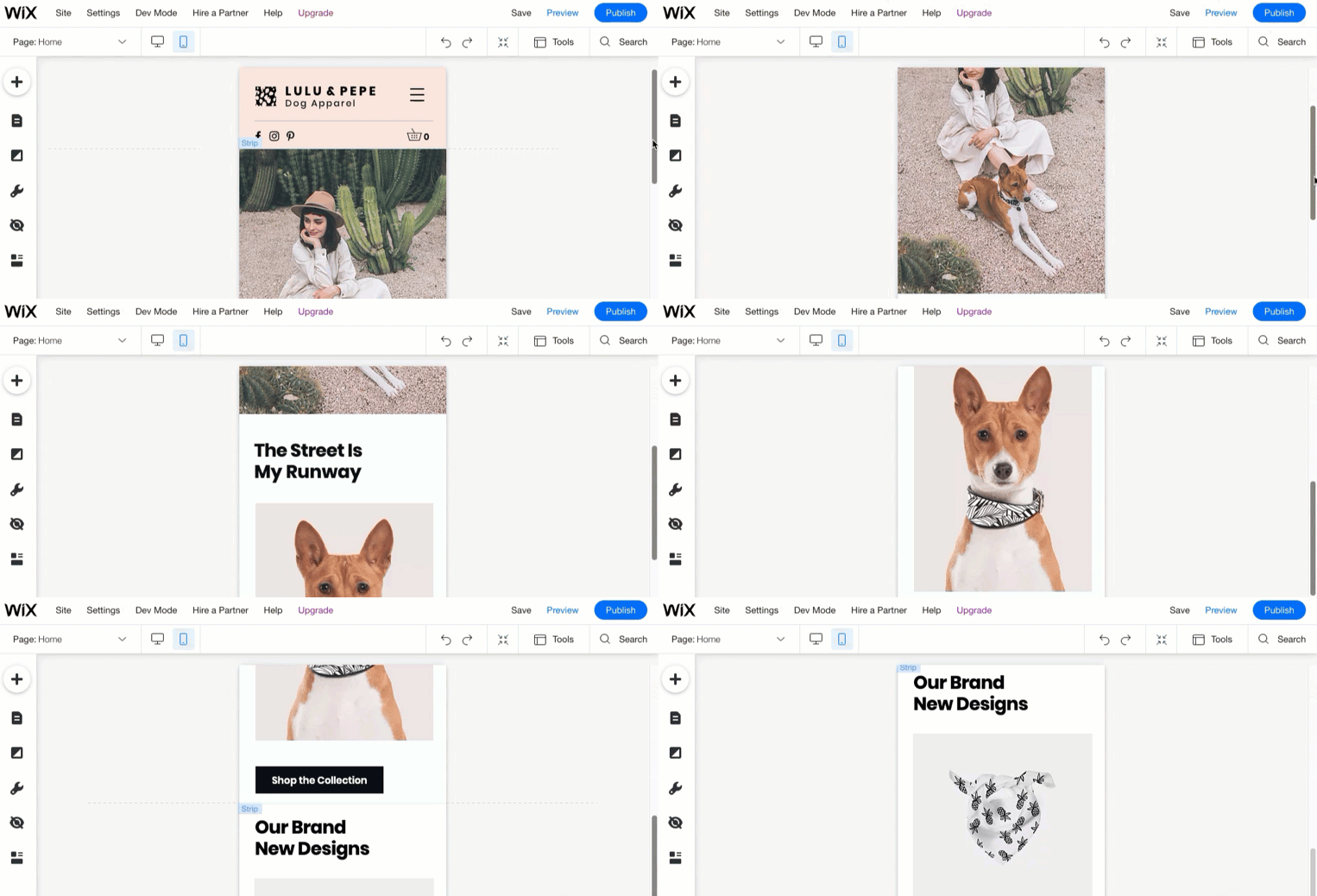
Use the Wix Mobile Editor to adjust view

In the Wix editor switch to mobile view and inspect each page. Hide or adjust elements that look fine on desktop but disrupt mobile layout. Wix mobile editor allows separate adjustments without altering desktop. YestoTech

Use single-column layouts and container boxes

Stacking content vertically helps eliminate horizontal scrolling. As noted in external guides, “use a single column layout” to make mobile navigation smoother. Odesigning

Group elements, lock containers and maintain structure

Group related elements into container boxes or strips so they remain aligned in mobile view. This prevents mis-alignment when viewed on mobile devices. Parah Group


Speed and performance fixes for Wix website builder mobile view

Compress images, use proper formats and lazy-load

Large images slow mobile sites. Convert to WebP, compress before uploading and let Wix lazy-load media that is off-screen. 911 Freelance+1

Limit animations, third-party apps and heavy scripts

Animations and external scripts add load time. According to Wix support, you should minimise interactive elements for mobile. Wix Support+1

Monitor real-user data and Core Web Vitals

Use Wix’s Site Speed dashboard and Google PageSpeed Insights to check mobile performance. Many Wix sites achieve 90+ mobile speed scores when optimised. Custom Web Audits


Usability tweaks to improve engagement on mobile for Wix website builder sites

Enlarge buttons and ensure touch-friendly navigation

Make sure buttons meet minimum size guidelines (like 44×44 pixels) and have enough spacing so mobile users tap easily. This fixes key mobile issues in Wix website builder sites. 10com

Simplify menus, avoid pop-ups and optimise for small screens

Mobile users need clarity and speed. Limit pop-ups, simplify menus and use smart navigation that guides users. This enhances usability and solves mobile issues in Wix website builder sites. taranker.com

Test across devices and screen sizes regularly

Don’t rely on desktop simulation only. Test on real phones and tablets, check performance and layout. Regular testing catches mobile issues in Wix website builder sites early.


Maintaining your mobile-optimised site for Wix website builder in 2025

Make mobile optimisation part of your update routine

Whenever you add new content, update design or install apps, always view the mobile version first and check for mobile issues in Wix website builder sites.

Update templates and review mobile view after major changes

Platform changes or template updates may impact mobile layout. Review mobile view after major edits to avoid new mobile issues in Wix website builder sites.

Offer professional review and support

If mobile issues in Wix website builder sites persist despite your efforts, working with a developer or designer familiar with mobile optimisation for Wix can make a big difference.


Conclusion

By proactively addressing mobile issues in Wix website builder sites in 2025 you ensure your site looks professional, loads quickly and engages visitors on all devices. If you’d like a partner who handles these tasks while you focus on your business, I’m here to help.

Ready to make your Wix mobile experience flawless? Visit aounraza.mrwebapp.com to explore my services and let’s optimise your site together.


FAQs

Q1: How do I check mobile issues in my Wix website builder site?
Open the mobile view in the Wix editor, then preview on a real phone. Check for layout breaks, slow loads, and usability issues.
Q2: Does optimising mobile view in Wix affect my desktop layout?
Changes made in mobile view don’t impact desktop layout in Wix, so you can adjust mobile without messing up desktop.
Q3: What is the easiest fix for mobile load speed in Wix website builder sites?
Compress large images, remove unnecessary apps or scripts, and use lazy-loading to fix speed issues.
Q4: Can I hide elements on mobile only in a Wix website builder site?
Yes — you can hide or show sections only on mobile using the Wix mobile editor’s visibility settings.
Q5: How often should I test for mobile issues in my Wix website builder site?
Test whenever you publish new content, change design, or install apps — plus a quick check monthly keeps things smooth.

Read More Now:-

Contact Syed Aoun Raza professional web designer and developer

How to contact Syed Aoun Raza

If you’re looking for a professional who blends creativity, technical skill, and business strategy, you’re in the right place. This guide will help you understand

Read More »
Syed Aoun Raza working on web design and development project

Why choose Syed Aoun Raza

When building or improving a website, the choice of designer and developer can determine your brand’s success online. That’s why understanding why choose Syed Aoun

Read More »
Developer moving from WordPress to Wix Website Builder 2025

Move from wordpress to Wix Website Builder 20265

If you currently run your site on WordPress and find yourself wishing for a simpler update flow, less maintenance overhead and a streamlined builder experience, then it makes sense to explore how to move from WordPress to Wix website builder. In this article I’ll walk you through why you might migrate, how to do the migration step-by-step, and what to watch out for — all in the context of 2026.


Why consider the migration to Wix website builder in 2026

Simpler management and lower complexity

Many business owners choose to move from WordPress to Wix website builder because they want to reduce the time spent on plugins, security updates and hosting issues. With Wix you get built-in hosting, automatic technical updates and a drag-and-drop interface. According to Wix’s comparison page this is one of their key advantages. wix.com+1 Instead of juggling multiple plugins and themes, you can focus on your content and audience.

Ideal for creators, startups and service businesses

If you run a smaller site or service-oriented business, migrating to a platform like Wix website builder makes sense. The platform supports templates, mobile responsiveness and built-in apps for bookings, e-commerce and blogs. And since the barrier to entry is lower, you can execute faster. This aligns well with your aim as a Wix designer and developer: you help business owners move quickly and effectively to an easier setup.


Pre-migration checklist before you move from WordPress to Wix website builder

Audit your current WordPress site

Start by listing all pages, posts, media files and plugins. Note any custom features like membership, forums or heavy ecommerce. Since you will migrate to Wix website builder, you need to confirm which features can be replicated or replaced on the new platform. Also back up your WordPress database and files.

Define your new site structure on Wix website builder

Before building, plan how your new site on Wix will look. Will you replicate the exact layout or refresh your brand while you migrate? Sketch a sitemap: Home, About, Services, Blog, Contact. On the new platform ensure your menu, footer and navigation reflect this structure. Planning helps avoid surprises during migration and speeds up your launch.

Prepare SEO strategy and redirects

When you move from WordPress to Wix website builder you must preserve your SEO performance. Map your old WordPress URLs to the new Wix URLs. Use 301 redirects if possible, and update links, meta tags and site structure to maintain ranking. Migration guides emphasise that redirect setup is critical. Cart2Cart+1


Step-by-step process to move from WordPress to Wix website builder in 2026

Export content from WordPress

In your WordPress dashboard go to Tools → Export and download your posts, pages and media. This gives you the raw content to import or replicate. While Wix doesn’t offer automatic full WordPress import, some blog posts can be imported. Wix Support+1

Create your new site on Wix

Log into Wix, choose a template or start from scratch and set up the site structure you defined. Use your brand colours, upload logo, set your fonts and configuration. Since you are offering Wix design and development services, this stage is where you deliver professional layout, calls to action and mobile optimisation.

Transfer pages and blog content

For each page from your WordPress site, create a matching page in the Wix website builder, paste the content, upload images and set up headings. On the blog side, you can use Wix’s blog import options to bring in posts from WordPress. Wix Support+1 Adjust meta titles and descriptions as you import each post.

Set up functional features and apps

If your WordPress site includes forms, booking tools, ecommerce, or membership areas, you’ll need to replicate these features on Wix website builder. Use the Wix App Market to install the relevant apps, configure payment gateways, shipping, or CRM integration. Double-check that dynamic pages, collections, and automation (if needed) work correctly.

Point domain, redirect old URLs and test

Once your new site is ready, connect your custom domain to Wix, enable SSL and publish the site. Then set up 301 redirects from your old WordPress URLs (if hosted or controlled) to the new Wix URLs. Check that every old link, inbound link and bookmark resolves correctly. Next, test your site across devices, load speeds and interactions.


Post-launch actions for your new Wix website builder site

Monitor analytics and performance

Use Google Analytics, Wix Analytics and Search Console to monitor traffic, behaviour and ranking. Compare your new site’s baseline metrics with what you had on WordPress. Look for drop-offs and fix them quickly. Keeping an eye on performance helps you catch and fix issues early.

Optimise for speed and responsiveness

Even though Wix handles many technical aspects, you must still optimise images, check mobile layouts and ensure fast page loading. A slow site can harm conversion rates and SEO. Use built-in tools or test your pages with PageSpeed Insights.

Maintain content, update regularly and refine

As part of your ongoing services as a Wix developer, you’ll want to refresh blog posts, update offerings, and keep the site aligned with your client’s business growth. Regular content updates and site maintenance keep the site relevant and high performing.


Common pitfalls when you move from WordPress to Wix website builder (and how to avoid them)

One of the biggest risks is neglecting your old WordPress URL structure. If you do not set correct redirects, you can lose search engine traffic and rankings. Create a redirect map and test each old URL to confirm it forwards properly. Cart2Cart

Missing features or integrations

Your WordPress site may include plugins or custom code that cannot be directly transferred to Wix website builder. Ensure that each feature is replaced by an equivalent in Wix or adjust your business needs accordingly.

Overlooking mobile and layout differences

Even though templates on Wix are responsive, you still must test each page on multiple devices. What looked good on desktop may require tweaks on mobile. As the developer, you’ll want to check interactions, form submissions and navigation.


Why work with a Wix designer/developer like me when you move from WordPress to Wix website builder

Migrating from WordPress to Wix website builder can look straightforward, but the real value comes from doing it with strategic thinking: preserving SEO, optimising user experience, and building a site that supports your business goals. I’ll handle the full migration, set up your new Wix site with best-practice design, mobile optimisation, SEO basics and ongoing maintenance. You focus on your service; I ensure your website works for you.


Conclusion

Moving from WordPress to Wix website builder in 2026 offers business owners and creators a streamlined path to a manageable, modern website. With proper planning, execution and a developer who knows the terrain, the migration can be smooth and effective. If you’re ready to shift your site to Wix with confidence and professional support, let’s talk.

Ready to make the transition? Visit aounraza.mrwebapp.com to explore my Wix migration and design services and let’s start building your future-proof website.


FAQs

Q1: Will my WordPress blog posts carry over automatically when I move from WordPress to Wix website builder?
Yes, you can import posts via the Wix blog import tool, but layout and some formatting may need adjustment. Wix Support

Q2: Can I keep my custom domain when I move from WordPress to Wix website builder?
Absolutely—just connect the same domain to your new Wix site and set up DNS properly.

Q3: How long does the migration from WordPress to Wix website builder take?
It depends on site size and complexity — a small site might take a few days, a larger one a couple of weeks.

Q4: Will migrating to Wix website builder affect my SEO rankings?
It can, if you don’t manage redirects, URLs and meta data. But with careful planning your rankings can remain stable.

Q5: Do I need to maintain hosting and security when I move from WordPress to Wix website builder?
No, Wix handles hosting, updates and security on its platform, which simplifies your workload.

Read More Now:-

Contact Syed Aoun Raza professional web designer and developer

How to contact Syed Aoun Raza

If you’re looking for a professional who blends creativity, technical skill, and business strategy, you’re in the right place. This guide will help you understand

Read More »
Syed Aoun Raza working on web design and development project

Why choose Syed Aoun Raza

When building or improving a website, the choice of designer and developer can determine your brand’s success online. That’s why understanding why choose Syed Aoun

Read More »
Screenshot of a business website built using the Wix website builder site template.

How to Build a Wix Website Builder Site in 2025

The platform offers an intuitive drag-and-drop interface, free hosting options, and hundreds of ready-made templates to choose from. Wix Support+2Wix Support+2 For many small businesses and solo creators, that means you can get a professional-looking site up without hiring a full design team.

Using the builder empowers you to focus on your business message and not get bogged down by technical setup. In the sections ahead we’ll cover planning your site, designing it, customising key features, publishing, and optimizing for performance.


Planning your Wix website builder site in 2025

Define your target goal and audience

Before you begin to build a Wix website builder site, clarify what you want the website to achieve. Are you selling products, showcasing a portfolio, generating leads, or providing information? Having that purpose will guide every design decision. Wix Support+1 Then define your audience: who they are, what they need, how they’ll use your site. That clarity will streamline your layout and content choices.

Map out your pages and structure

Once you know your goals, draft the site structure. For a typical business site: Home, About, Services/Products, Blog/Resources, Contact. With the builder you can create each page quickly and keep navigation simple. According to design standards, fewer clicks = better user experience. wix.com Create a simple sitemap and write short descriptions of what each page will deliver before diving into design.


Setting up your site using the Wix website builder

Choose a template or start with a blank canvas

When you’re ready to build your Wix website builder site, login and pick either a pre-designed template or a blank canvas. The builder supports over 800 templates designed for many industries. Wix Support+1 Choosing a template that aligns with your brand saves time, while a blank canvas gives you full creative freedom. Either way, pick one and move on.

Customise design elements (fonts, colours, layout)

In the builder you’ll customise colours, fonts, images and layout. If your brand already has colours and fonts, apply them across the site to maintain consistency. The builder’s drag-and-drop tools make this straightforward. Tom’s Guide+1 Pay attention to mobile view as well — every element you place should look great across devices.

Add your content and images

Now you’re ready to add your real content: copy, images, logos, video if needed. Write clear headlines and supporting text that speak to your audience. Upload high-quality images and use alt-text descriptions that include relevant keywords — for example “business team using Wix website builder site design”. This helps both accessibility and search engines.

https://d2x3xhvgiqkx42.cloudfront.net/12345678-1234-1234-1234-1234567890ab/a1c473d0-e600-4b63-ae67-997d73da1139/2024/09/23/33f6b991-893d-448c-885c-7bc827e0d98f/2570b378-a51f-4963-8083-02710503ffc6.png
https://static.wixstatic.com/media/84b06e_46d6d09a0cf14dd6b491f55de29d2b2d~mv2.png/v1/fill/w_924%2Ch_639%2Cal_c%2Cq_90%2Cenc_avif%2Cquality_auto/84b06e_46d6d09a0cf14dd6b491f55de29d2b2d~mv2.png
https://d2x3xhvgiqkx42.cloudfront.net/12345678-1234-1234-1234-1234567890ab/8696077d-830a-4b1e-bd86-9df98f89994a/2021/05/25/71c90c5e-7959-4bd8-ba1e-8010b2f40c61/ec3592b0-3f92-4e66-83d8-7407801f7265.gif

Setting up essential features for your site

Connect a custom domain and enable SSL

Once you build your site in the Wix website builder, connect a custom domain (yourbusiness.com) rather than using a default subdomain. This enhances credibility and SEO. Also ensure SSL (HTTPS) is enabled — it’s standard now for any business-focused site.

Add key functional elements (forms, ecommerce, blog)

Depending on your goal you might add a contact or lead-capture form, ecommerce product pages, or a blog. The Wix App Market lets you integrate useful tools easily. Wix Support+1 If you’re selling products, set up payment gateways and shipping options. If you’re capturing leads, embed a simple form and link it to your email marketing list.

Optimize for performance and mobile

Every page you build using the Wix website builder site interface must load quickly and display properly on mobile devices. Test navigation, images and forms on mobile. Large images slow loading time and can harm user experience. Also check that buttons are easy to tap and text is readable. Performance affects both conversion and ranking.


Optimising your Wix website builder site for SEO in 2025

Use Wix’s built-in SEO tools

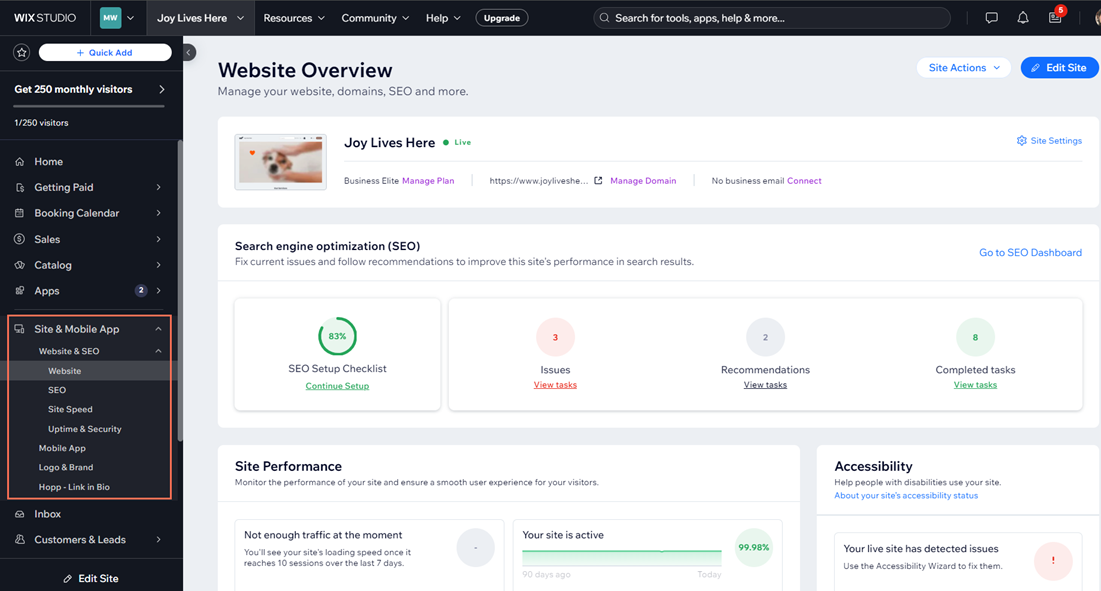
The platform provides an SEO Setup Checklist to help your site get visible in search engines. Wix Support+1 Use that checklist to set page titles, meta descriptions, alt texts and structured data. For example, on your homepage use a meta description like: “Professional business website built with the Wix website builder site platform for creators and startups.”

Write content that answers user problems

To rank well, your site must satisfy real user intent. For a service-oriented creator, that might mean blog posts like “How to speed up my Wix website builder site’s mobile loading”. This focus on problem-solution improves relevance and engagement. Use transitional phrases (“In addition”, “Next”, “As a result”) to improve readability.

Internal linking and external credibility

Link internally to other relevant pages on your site (for instance your Services page, Blog section, or Contact page) to keep readers engaged longer. Also link externally to authority sources (such as official advice from the builder’s own site or reputable web design agencies) to add trust. For example, you might reference the official guide from Wix. Wix Support


Launching and maintaining your Wix website builder site

Publish and test live

Once everything looks good in preview mode, hit Publish. Then test your live site across devices, browsers and screen sizes. Check form submissions, ecommerce checkout (if applicable), mobile layout and site speed. Mistakes caught after launch cost more to fix.

Monitor analytics and iterate

After launch you should monitor site traffic, user behaviour and conversions using tools like Google Analytics or the built-in Wix analytics. See what pages perform best and where visitors drop off. With real data you can iterate — update imagery, tweak text, improve call-to-action buttons. Regular updates keep your site fresh and relevant.

Regular updates for design, content and plugins

Even after launch your Wix website builder site isn’t “done”. Update your content, add new blog posts, refresh key pages and check for broken links. Update any apps or features via the Wix App Market. Regular maintenance keeps your website competitive and aligns with SEO best practices.


Why hire a Wix designer and developer (like me) for your site?

While the Wix website builder site platform is user-friendly, you might want to delegate the time-consuming tasks and ensure professional quality. If you’re focused on growing your business, I can help you with template customisation, performance optimisation, branded design, blog setup, SEO groundwork and ongoing maintenance. Let’s make sure your site not only looks great but drives results.


Conclusion

Building a Wix website builder site in 2025 is entirely feasible for business owners, creators and startups — as long as you follow a clear process: plan, design, set up features, optimise for SEO, launch and maintain. And if you’d prefer someone to handle the details while you focus on growth, I’m ready to help.

Call-to-Action: Ready to get your site off the ground? Explore my Wix design and development services at aounraza.mrwebapp.com and let’s build an effective website that works for you.


FAQs

Q1: How long does it take to build a Wix website builder site?
It depends on complexity, but a basic business site can be live in 1-2 days, while a larger ecommerce or custom site may take a week or more.

Q2: Do I need to know coding to use the Wix website builder?
No — the builder is designed for non-coders. You can still add custom code if needed via advanced features. wix.com

Q3: Can I switch templates after my site is built with Wix?
Yes — you can change templates, but major design changes may require some layout adjustment afterwards.

Q4: Is SEO on Wix as good as other platforms?
Yes—with the right setup you can achieve strong SEO. Use the built-in SEO tools and focus on quality content and optimization.

Q5: What budget should I plan for hosting and features when building a Wix website builder site?
You can start with free hosting under Wix’s free plan, but to connect a custom domain, remove branding and add ecommerce you’ll need a Premium plan.Wix Support+1


Thank you for reading — let’s build something great together!

Read More:-

Contact Syed Aoun Raza professional web designer and developer

How to contact Syed Aoun Raza

If you’re looking for a professional who blends creativity, technical skill, and business strategy, you’re in the right place. This guide will help you understand

Read More »
Syed Aoun Raza working on web design and development project

Why choose Syed Aoun Raza

When building or improving a website, the choice of designer and developer can determine your brand’s success online. That’s why understanding why choose Syed Aoun

Read More »